Speeding Up My Internet With Five Bad DSL Lines
What's the thing you lack the most when you're a 3rd world chronically online nerd like me?
Internet speed.
I have spent most of my life using the cursed version of the internet. The kind where downloading a game was not something you did before playing. It was something you scheduled around school, sleep, electricity, and hope.
Before the actual nonsense starts, here's the short lore dump. If you do not care about childhood download trauma, skip to the stupid part.
When I was around 5, my home internet was a USB LTE modem with roughly 200 MB of monthly quota at 512 kbps. After that, it crawled. My dad had a better connection at work, so my very advanced strategy was:
- Google the game.
- Email him the link.
- Wait for him to download it.
- Receive treasure.
Peak infrastructure. 
Years later I finally got home ADSL, then VDSL, and eventually ended up with a line that was technically "fine" if your definition of fine includes staring at Steam downloads like they are trying to teach you patience.
One line could do around 40-ish Mbps reliably. Sometimes more, but pushing it too hard made it collect errors, dip randomly, or just give up like it had emotional commitments elsewhere.
So the problem was simple:
I wanted fiber. Fiber did not want me.
The Normal Answers
"Just get FTTH bro."
Thank you. Groundbreaking. I have tried.
Telecom Egypt is rolling out fiber, but not fast enough for me to build my life around it. Wireless and 5G were not good answers either because quota, price, coverage, and consistency all start fighting each other. Starlink is not an option here.
So the normal answers were basically:
- wait,
- pay too much for a worse compromise,
- or stop being annoying.
Naturally, I picked option four: become dramatically more annoying.
The Stupid Part
The idea was:
What if one sad DSL line is bad, but five sad DSL lines together are... less sad?
The setup ended up looking like this in human terms:
PC -> switch -> Raspberry Pi -> several DSL lines -> bonded tunnel -> VPS -> internet
That is the whole trick.
The PC thinks the Raspberry Pi is the gateway. The Pi takes the traffic, spreads it across multiple DSL connections, sends it through a tunnel to a VPS, and the VPS becomes the public exit to the internet.
There is also a MikroTik hEX in the middle helping fan out some of the DSL paths, plus one extra line coming through a USB Ethernet dongle on the Pi. That sentence is already more topology than any innocent blog reader deserves, so I am stopping there.
No private LAN address tables. No topology spreadsheet. No "line 3 lives on interface whatever." Those details matter while debugging, but they are not the story.
The story is:
I made copper suffer in parallel.
Did It Work?
Yes.
Also, Not lol.
The first version was already better than my single line. One early speed test landed around 88 Mbps down and 7.5 Mbps up, which was not magical, but it was enough to prove the idea was real.
After more tuning, Steam downloads started peaking much higher. The good moments were in the around 200 Mbps zone, which felt insane compared to where I started. The less good moments hovered closer to 140-170 Mbps, which is still faster than one line, but emotionally rude after seeing the big number once.
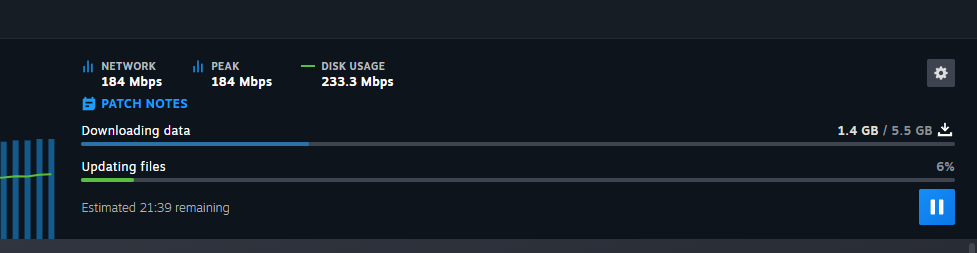
For scale: a 28.4 GB game download at a clean 200 Mbps is about 19 minutes. At 100 Mbps it is about 38 minutes. On my old internet, that was not a download, that was an era 
The real goal is not "touch 200 once for a screenshot." The goal is:
Stay comfortably above 100 Mbps without the whole setup faceplanting.
The Part That Made It Feel Real
Speed tests are cute, but they are also kind of fake as a life measurement.
The thing that made this project feel real was Steam.
Not because Steam is special, but because game downloads are the exact kind of thing that used to bully my internet. A big download on one line meant the whole house could feel it. Pages loaded worse, Discord got weird, and I would end up micromanaging download limits like I was negotiating with a hostage taker.
With the bonded setup, the first magical moment was not just seeing a bigger number. It was seeing a big download run while the connection still felt alive.
That is the difference between "fast on paper" and "actually useful."
I do not need every second to be a perfect 200 Mbps. I need the connection to stop acting like one download is a national emergency. If it can hover high, recover from dips, and keep the rest of the network usable, that is already a huge win.
The funny part is that this changed the feeling of downloading things more than the math suggests. Going from "I should start this before sleeping" to "eh, I can download it now" is the kind of luxury that fiber people probably do not even notice.
I notice.
The Tunnel Bit
The current tunnel is Glorytun.
Glorytun can take multiple paths and make them behave like one tunnel. When it works, it is great: traffic leaves my house across the DSL lines, reaches the VPS, then exits to the public internet from there.
The annoying part is that it did not always fail in an obvious way.
Sometimes the service was still running. The Pi still listed paths as alive. Everything looked fine from a distance.
But actual traffic through the tunnel was dead.
That is the kind of failure that makes dashboards lie to your face. The process is alive, the paths are "running," and yet packets are not moving. Very cool. Very normal. I love being tested by appliances.
The useful lesson was:
The only health check that matters is real traffic through the tunnel.
Not "is the service active?"
Not "does the path list look happy?"
Actual packets. Through the tunnel. To the other side.
Once I started treating that as the truth, the system got much less cursed.
Why It Kept Exploding
The biggest failure mode was Glorytun getting wedged rather than cleanly crashing.
The rough pattern was:
- The Pi side looked alive.
- The VPS side disagreed.
- The tunnel interface stopped passing traffic.
- Restarting both ends fixed it immediately.
That means the fix was not just "restart the service when it exits," because the service did not necessarily exit. It was alive in the most useless possible way.
So I changed the approach:
- prove tunnel traffic, not process status,
- use stricter loss limits on bad paths,
- keep the rates slightly under sync instead of running every line at the edge,
- and fail open through a normal line if the bond is unhealthy.
That last one matters a lot. Fast internet is nice. Internet that does not disappear at 4 AM while I am in the middle of something is nicer.
The Control Panel
Because typing route commands at 3 AM is how a person slowly becomes furniture, I built a small local panel.
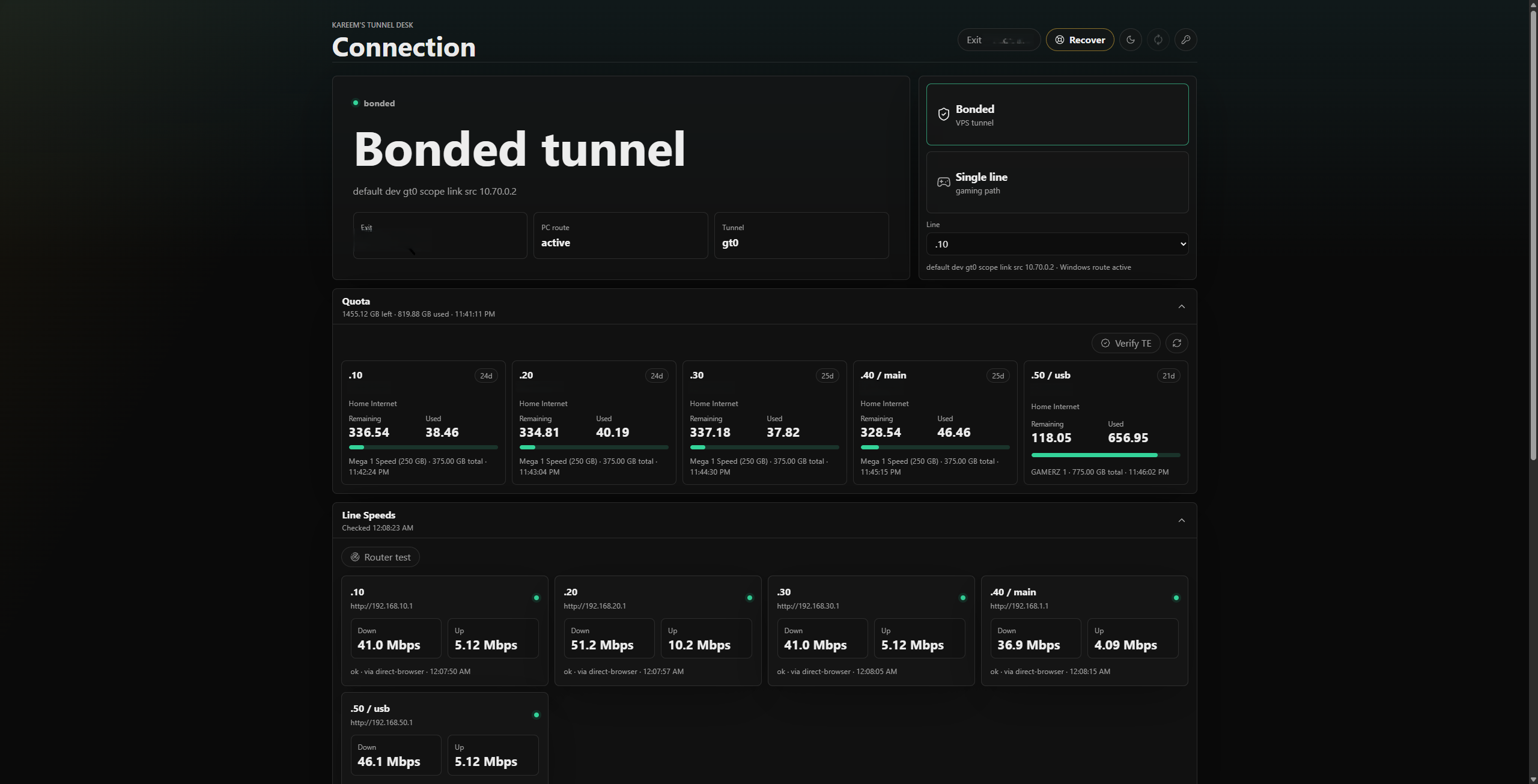
It now has the things I actually care about:
- a big switch for Bonded vs Single line,
- live DSL sync rates,
- quota remaining for each subscription,
- Glorytun path health,
- a recovery button for when the tunnel gets weird,
- gaming mode that pins the PC to one chosen line,
- and rate tuning that can set the tunnel to "current sync minus X Mbps."
That last one is important. These DSL lines sometimes dip and recover quickly. Running them at the absolute sync rate is tempting, but it gives the tunnel no breathing room. Setting each path to sync minus a small cushion is much more civilized.
Basically:
Router says line can do 50 Mbps
Panel sets tunnel to 49 Mbps
Line has a little room to wobble
Everyone screams less
That is the kind of math I support.
The panel also tries very hard not to strand my PC. Before switching Windows onto the bonded route, it checks that the tunnel is actually passing traffic. If the proof fails, it should leave the rescue path alone.
This rule exists because I did, in fact, strand my own PC while debugging this. More than once (more like 20). 
Gaming Mode
Bonding is fun for downloads, but gaming is a different animal.
For games, I care more about stable latency than raw throughput. Spraying packets across several DSL lines and a tunnel can be amazing for bulk downloads, but it is not always what I want for a match where one weird latency spike means I get deleted.
So the panel has a single-line mode.
When I want to download something huge, I use bonded mode. When I want to play, I pick whichever line is behaving best and route the PC through that one.
It is not elegant, but it is honest.
The Cost vs Value Bit
This is where the idea gets very funny if you look at it like a normal consumer.
Is this cheaper than having one proper fiber line?
No. Obviously not.
One good fiber connection would beat this setup in almost every sane category: latency, stability, power usage, simplicity, support calls, mental health, number of blinking boxes in the room. If fiber was available, this whole project would be a very dramatic way to avoid ordering the normal thing.
But that is the annoying part: the normal thing is not available to me yet.
So the real comparison is not "five DSL lines vs fiber." The real comparison is:
one mediocre DSL line now
vs
several mediocre DSL lines pretending to be something better now
vs
waiting indefinitely for fiber
And in that comparison, the value starts making more sense.
I am not only paying for speed. I am paying for options. If one line is having a bad day, the others can still carry the download. If I want raw throughput, I use bonded mode. If I want lower-risk latency for games, I pick one line. If a subscription is running low on quota, the panel can show it before I discover it through suffering.
It is still not efficient. There is a VPS bill, extra subscriptions, extra hardware, extra power, and the hidden cost of me sitting there at 3 AM muttering at routing tables like a Minecraft villiger reading enchantment table recipes.
But the value is not just Mbps per pound.
The value is turning "my internet is slow and I can do nothing about it" into "my internet is weird, but I have levers."
That matters more than it probably should.
Was It Worth It?
For a normal person?
Absolutely not.
This is the kind of project where the solution becomes a second hobby. You need multiple subscriptions, several modems, a Pi, a VPS, tunnel software, routing rules, NAT, monitoring, and enough patience to debug why the internet is technically connected but spiritually absent.
But for me, yes.
It is annoying in the way a good project is annoying. I learned a ton about policy routing, tunnels, path health, bad copper, Windows route behavior, and the difference between "a service is running" and "the thing works."
Also, the first time Steam blasted past what one DSL line could ever do alone, I forgave a lot.
Not everything.
But a lot.
What Happens Next
Glorytun works, but I do not fully trust it yet. sometimes it just stops like a clock that ran out of battery, though at least a broken clock is right twice a day but this one isn't.
What I want next is not a cooler diagram or a more cursed stack. I want the whole thing to become boring.
The dream version is (almost there):
- plug Ethernet in,
- click Bonded,
- download like a little menace,
- switch to Single line for games,
- never think about routes at 4 AM again.
There are still a few things I want to polish. The panel should collect better history so I can tell which line misbehaved after the fact. The rate tuning should get smarter as the DSL lines settle. The quota view should be less "website scraping pain" and more "glance once, know what is running out." And I want more real screenshots, because if I am going to suffer for internet speed, I should at least get blog material out of it,
I haven't included any images of the physical setup, because it was so alienating to my room that i had to do a "if you don't see it, it's not there" and shove the whole thing under a chair  , it looks like you just entered a server room in the early 2000s, except this one is filled with more blinking lights enough to kill a victorian kid, for context: this whole setup required a 10 sockets power strip. so i'll let you imagine that.
For now, the setup is in the funniest possible state:
- much faster than one line,
- not as stable as fiber,
- increasingly usable,
- deeply silly,
- and somehow still cheaper than waiting for the universe to hand me FTTH.
This whole thing started as "can I make my internet faster?"
It became "can five mediocre connections pretend to be one good connection without detonating?"
The answer is:
Kind of.
And honestly, for copper, "kind of" is already a miracle.